Instructions to use yangheng/PlantRNA-FM with libraries, inference providers, notebooks, and local apps. Follow these links to get started.
- Libraries
- Transformers
How to use yangheng/PlantRNA-FM with Transformers:
# Use a pipeline as a high-level helper from transformers import pipeline pipe = pipeline("fill-mask", model="yangheng/PlantRNA-FM")# pip install -U transformers accelerate # Load model directly from transformers import AutoTokenizer, AutoModelForMaskedLM tokenizer = AutoTokenizer.from_pretrained("yangheng/PlantRNA-FM") model = AutoModelForMaskedLM.from_pretrained("yangheng/PlantRNA-FM", device_map="auto") - Notebooks
- Google Colab
- Kaggle
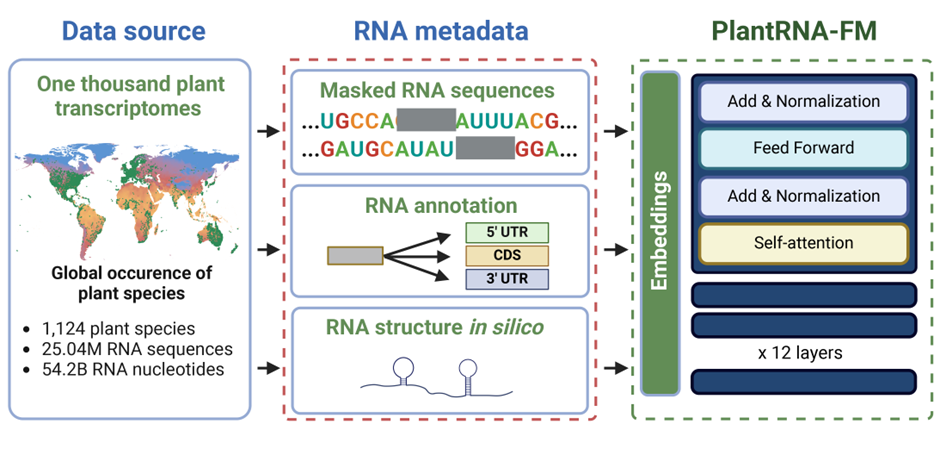
Download model.png from yangheng/PlantRNA-FM: direct link, hf CLI and curl.
- Browser
- Download file 173 kB
-
https://huggingface.co/yangheng/PlantRNA-FM/resolve/main/model.png
- Command line
-
hf download hf://yangheng/PlantRNA-FM/model.png
-
curl -L -o model.png https://huggingface.co/yangheng/PlantRNA-FM/resolve/main/model.png
173 kB