

MinerU2.5-Pro: Pushing the Limits of Data-Centric Document Parsing at Scale
Paper • 2604.04771 • Published • 99
GGUF builds of MinerU2.5-Pro, made by Moonbox for on-device use with llama.cpp
(Metal, CUDA, Vulkan, CPU). Every file is at the root of this repository: one model file per precision, plus the
mmproj-*.gguf file that holds the model's encoder (audio, vision or codec) when it has one. That file is shared by
every precision. Pick a precision by the memory you have.
The last column is the benchmark: the task score of each file on Moonbox's evaluation set for this kind of model (details under How to run), and how often it gives exactly the same output as the BF16 file. The BF16 file holds the original weights unchanged.
| Precision | File | Size | sha256 | Benchmark |
|---|---|---|---|---|
| F16 | mineru2-5-pro-F16.gguf |
994.2 MB | 1ea2c6e67ccc |
CER 0.0 % / 0.0 %; same text as BF16 on 6 + 6 of 12 pages; 0.26 s per page (CUDA) |
| all | mmproj-mineru2-5-pro-F16.gguf |
1.33 GB | e9c9e46a2c67 |
encoder file, used with every precision |
| BF16 | mineru2-5-pro-BF16.gguf |
994.2 MB | 78dc5faa2ca0 |
CER 0.0 % / 0.0 % (original 0.0 / 0.0); 0.27 s per page (CUDA) |
| Q8_0 | mineru2-5-pro-Q8_0.gguf |
531.1 MB | 4f3de8c43d8d |
CER 0.0 % / 0.0 %; same text as BF16 on 6 + 6 of 12 pages; 0.26 s per page (CUDA) |
| Q6_K | mineru2-5-pro-Q6_K.gguf |
505.7 MB | 35f684aeeb81 |
CER 0.0 % / 0.0 %; same text as BF16 on 6 + 6 of 12 pages; 0.23 s per page (CUDA) |
| Q5_K_M | mineru2-5-pro-Q5_K_M.gguf |
420.1 MB | a8b28f560851 |
CER 0.0 % / 0.0 %; same text as BF16 on 6 + 6 of 12 pages; 0.24 s per page (CUDA) |
| Q4_K_M | mineru2-5-pro-Q4_K_M.gguf |
397.8 MB | f80a973f782f |
CER 0.0 % / 0.0 %; same text as BF16 on 6 + 6 of 12 pages; 0.20 s per page (CUDA) |
The model file holds the 0.5B Qwen2 decoder. mmproj-mineru2-5-pro-F16.gguf holds the Qwen2-VL vision encoder and its
merger, kept in F16 for every precision. Both files are needed. With llama.cpp b12621 or newer:
llama-mtmd-cli -m mineru2-5-pro-Q8_0.gguf --mmproj mmproj-mineru2-5-pro-F16.gguf -ngl 99 \
    --image block.png -p "Text Recognition:" --temp 0
llama-server serves it through /v1/chat/completions with the page or block as an image_url part. The benchmark
used MinerU's text-block request: the system message You are a helpful assistant., then the image and the text
\nText Recognition:. MinerU's full document pipeline (mineru_vl_utils: layout detection, then one request per
block) calls the model with its other prompts the same way.
The converter changes the layout of two kinds of tensor, and the values stay the same:
qkv weights are split into q / k / v.All 681 tensors of the original checkpoint were found with the same values in these files.
Benchmark.
llama-server /v1/chat/completions on CUDA (RTX 3080 Laptop).From MinerU2.5-Pro at revision 08aaea8404, with llama.cpp b12621:
convert_hf_to_gguf.py wrote the BF16 model file and the mmproj file.llama-quantize made the other precisions from the BF16 file, with its standard mixes.Before upload, every tensor of the original checkpoint was found with the same values in the BF16 model file and the
mmproj file. The sha256 column above is what the files must hash to.
apache-2.0. These files are a derivative of the original model and carry its license. The license is copied in this repository, and it governs your use of these files. The original model card follows unchanged.




2026.05.21 🎉🎉 We are pleased to announce the release of MinerU2.5-Pro-2605, an updated version of our model.
Enhanced Layout Detection
To address the category misclassification issues observed in the 2604 version during layout detection, we conducted a comprehensive data cleaning process. This has substantially reduced category errors in layout detection. Notably, the missed detection rate for the image_block category has been significantly reduced.
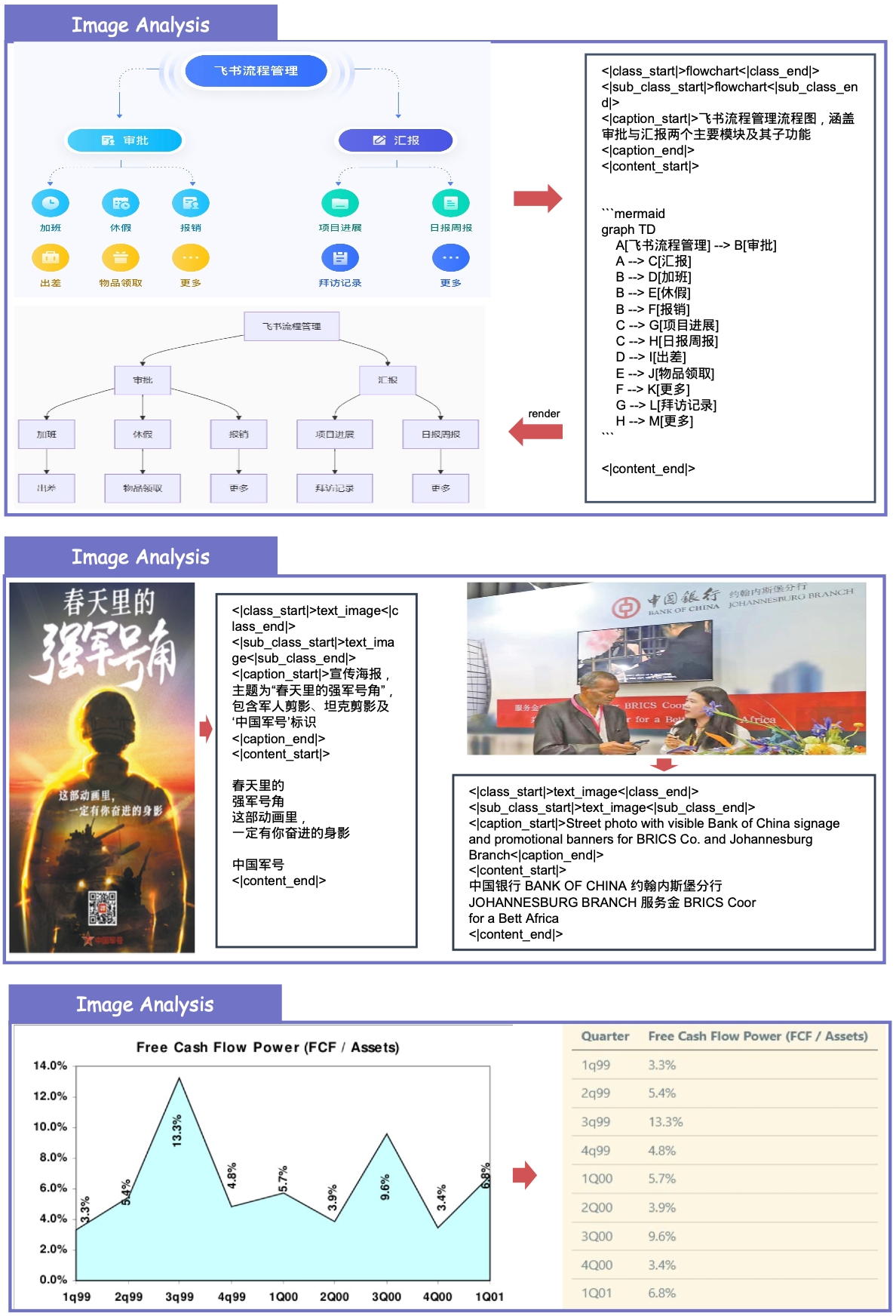
Improved Image Analysis To overcome the limitations of the 2604 version in image analysis, we constructed a large-scale training dataset for this task. As a result, the 2605 version demonstrates markedly enhanced recognition capabilities across a wide range of charts, flowcharts, and even seals.
Comparable Performance on OmniDocBench The 2605 version primarily focuses on enhancing user experience, with performance metrics showing only marginal differences compared to the 2604 version. A detailed comparison of the metrics is presented below:
| Model Version | Overall↑ | TextEdit↓ | FormulaCDM↑ | TableTEDS↑ | TableTEDS-S↑ | Read OrderEdit↓ |
|---|---|---|---|---|---|---|
| MinerU2.5-Pro-2605 | 95.72 | 0.036 | 97.15 | 93.62 | 96.01 | 0.123 |
| MinerU2.5-Pro-2604 | 95.69 | 0.036 | 97.29 | 93.42 | 95.92 | 0.120 |
MinerU2.5-Pro is our latest document parsing model (PDF-to-Markdown) that establishes a new industry standard. By focusing entirely on data engineering without altering the original 1.2B-parameter architecture, it delivers exceptional results across the board:
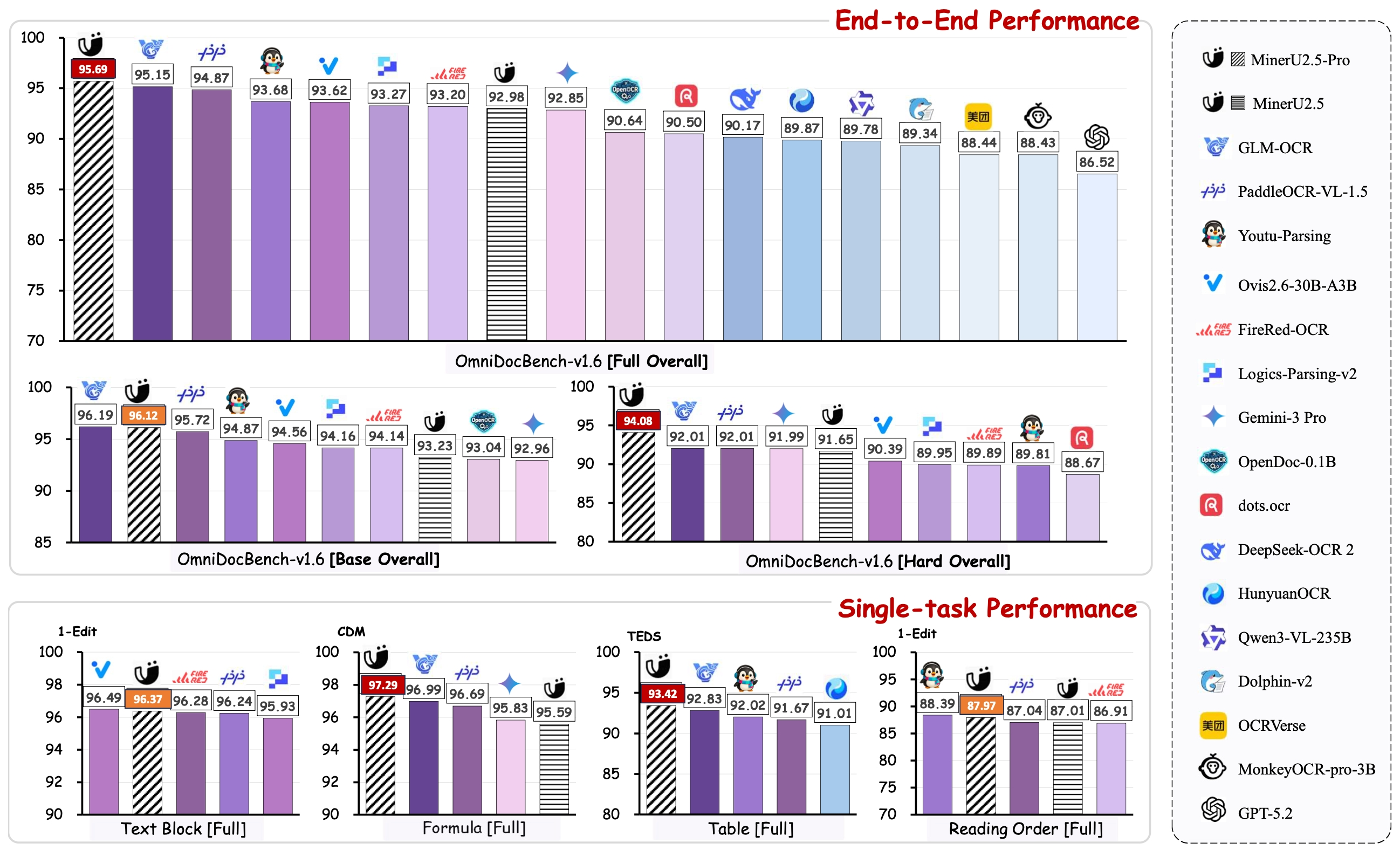
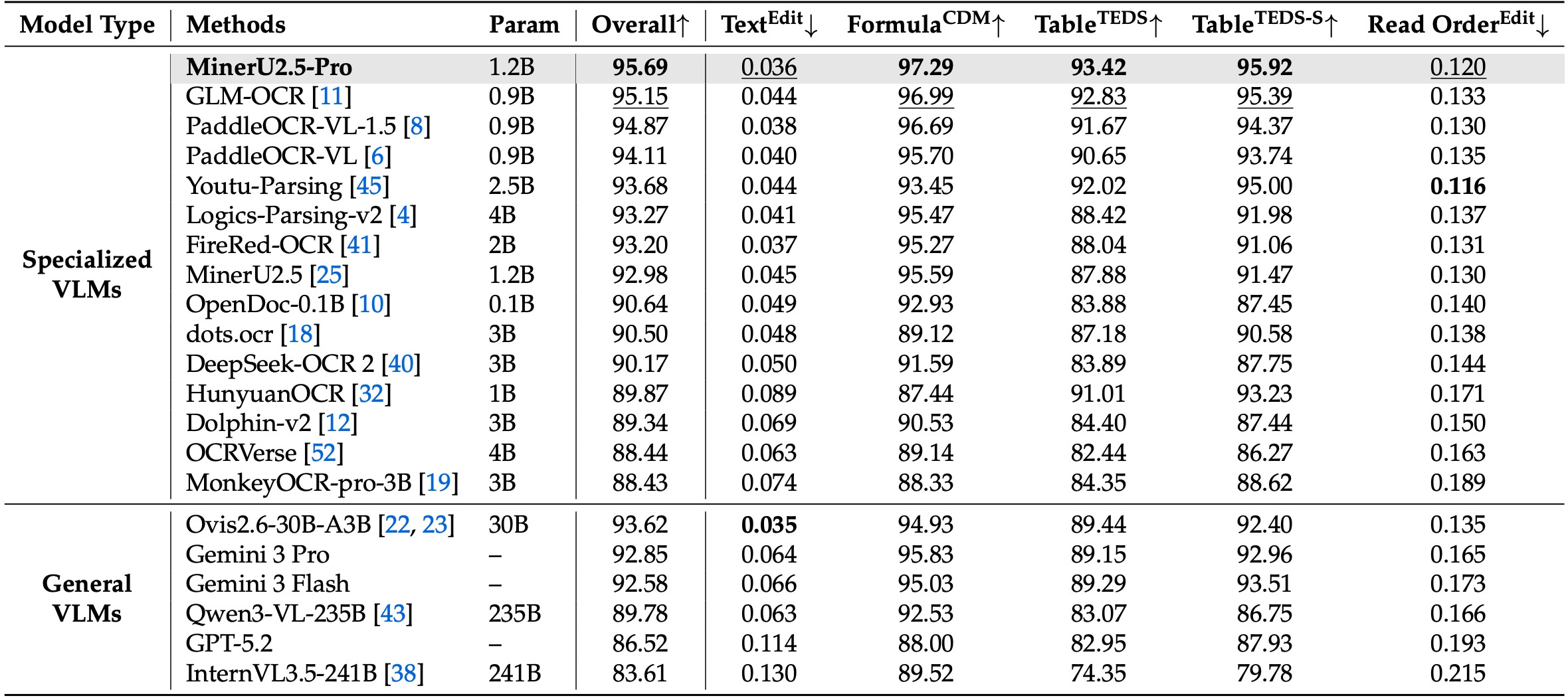
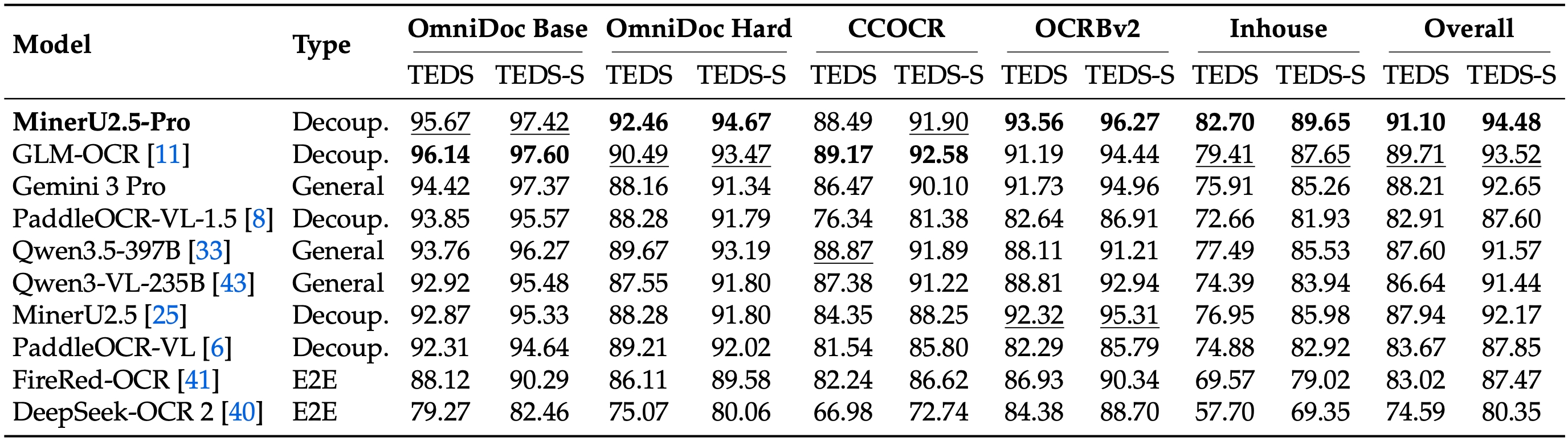
1. Defeating Leading Models on OmniDocBench v1.6 On the newly proposed, highly rigorous OmniDocBench v1.6, MinerU2.5-Pro achieves the absolute SOTA overall score of 95.69. It comprehensively outperforms both top-tier specialized OCR models (GLM-OCR, PaddleOCR-VL-1.5) and massive frontier VLMs (Gemini 3 Pro, Qwen3-VL-235B).
2. Massive Leap from MinerU 2.5 via Data Engineering Compared to the previous MinerU 2.5 baseline, the overall score skyrocketed from 92.98 to 95.69. This breakthrough was achieved not by scaling model parameters, but through meticulous data engineering—drastically expanding data scale, enriching distribution and difficulty diversity, and systematically elevating annotation quality.
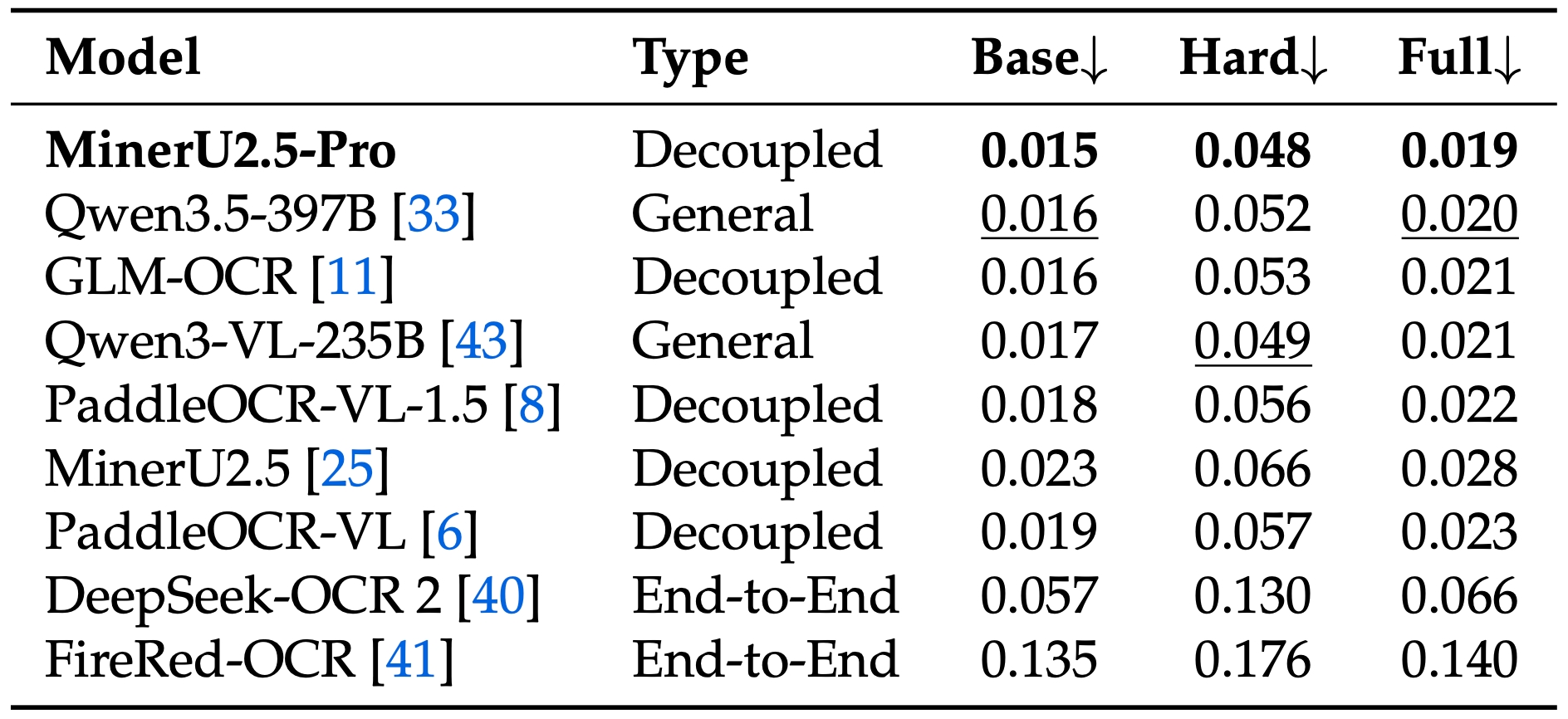
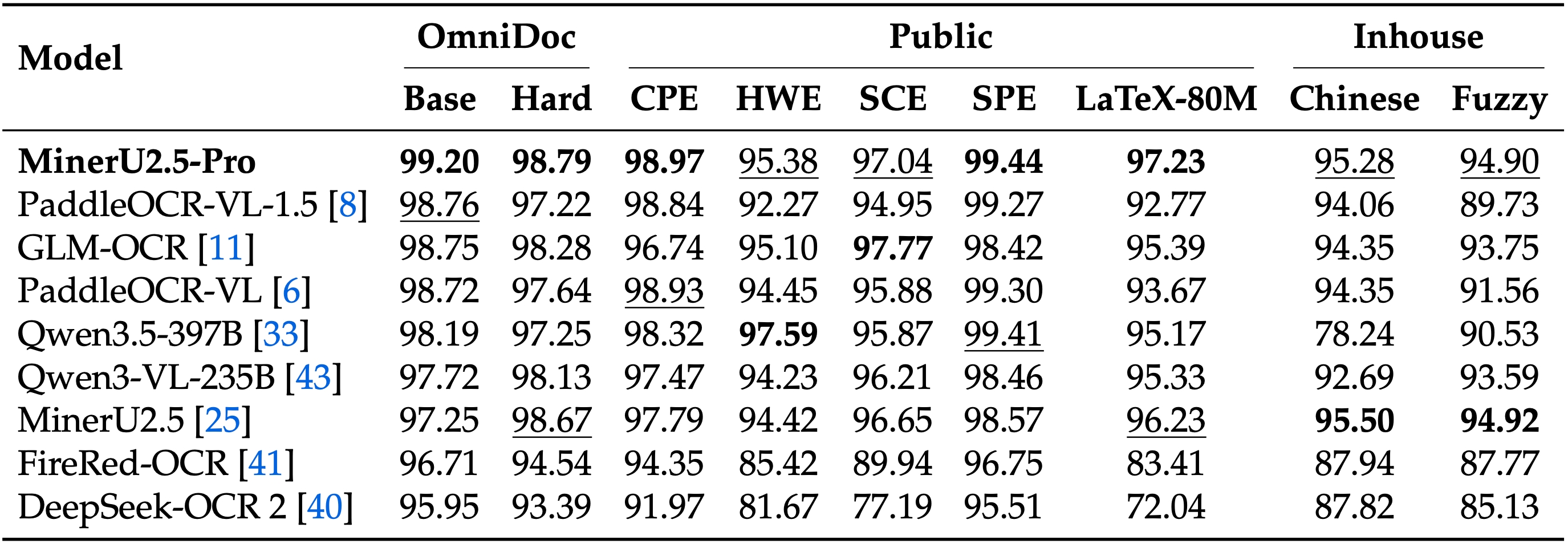
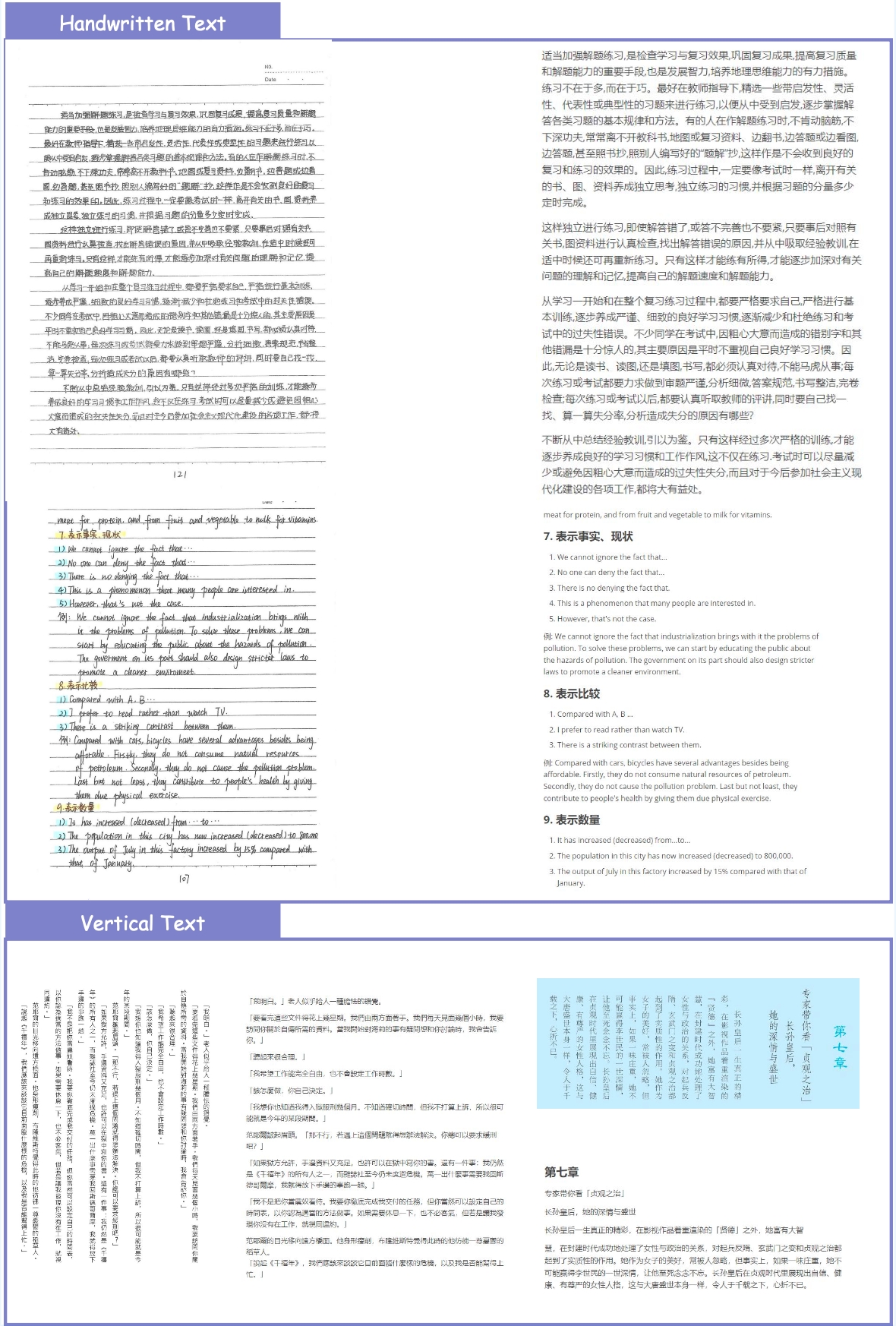
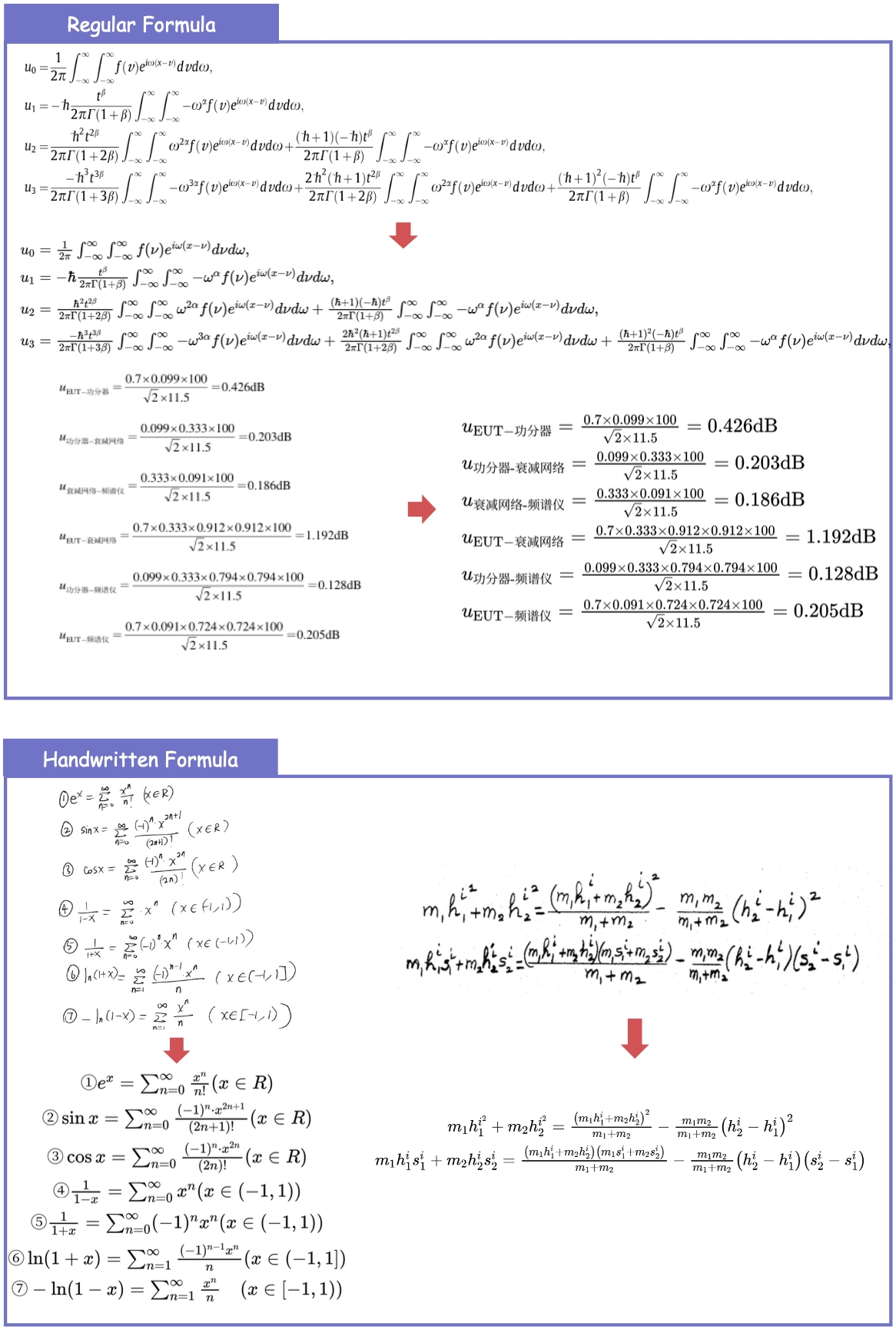
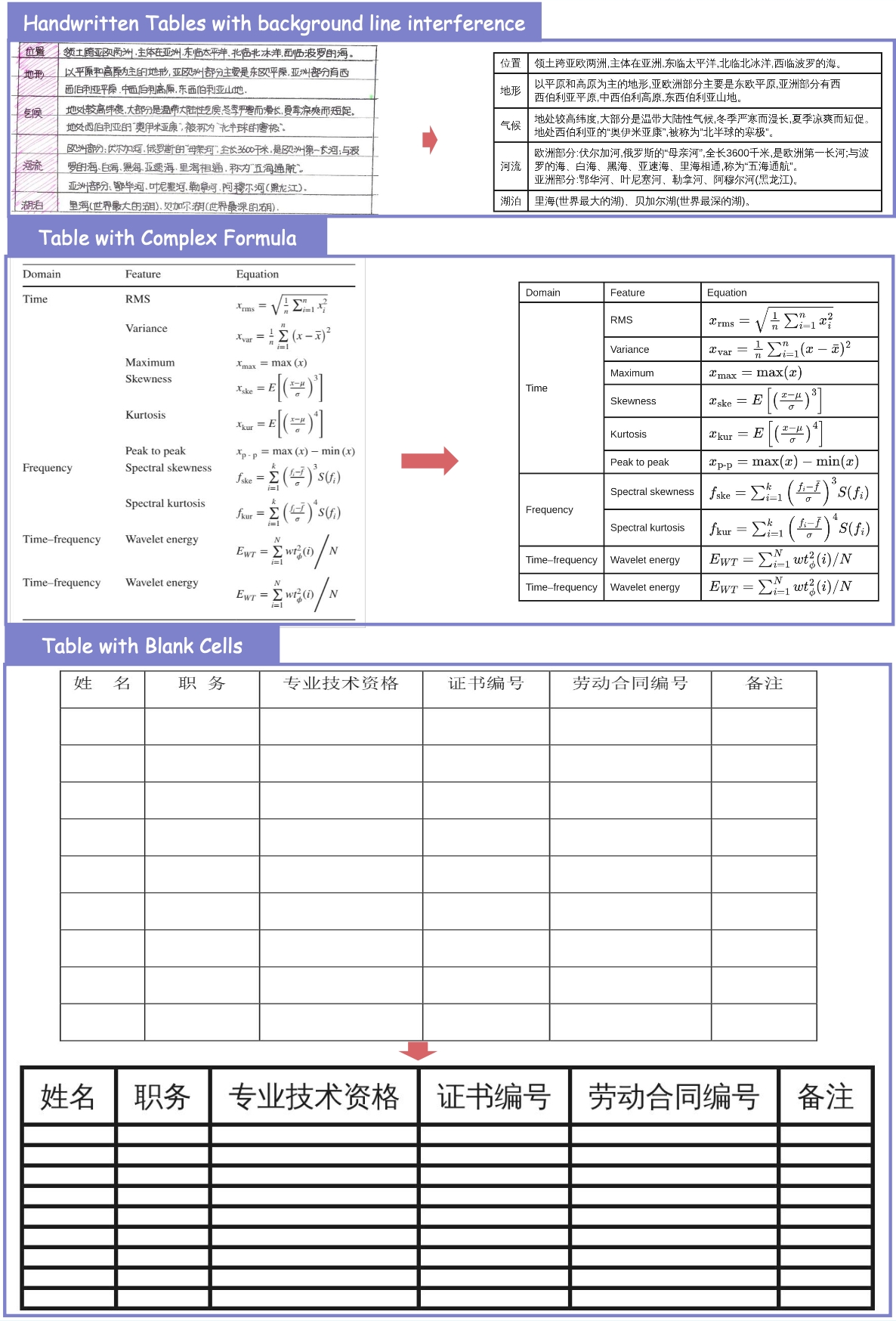
3. Exceptional Modality-Specific Breakthroughs
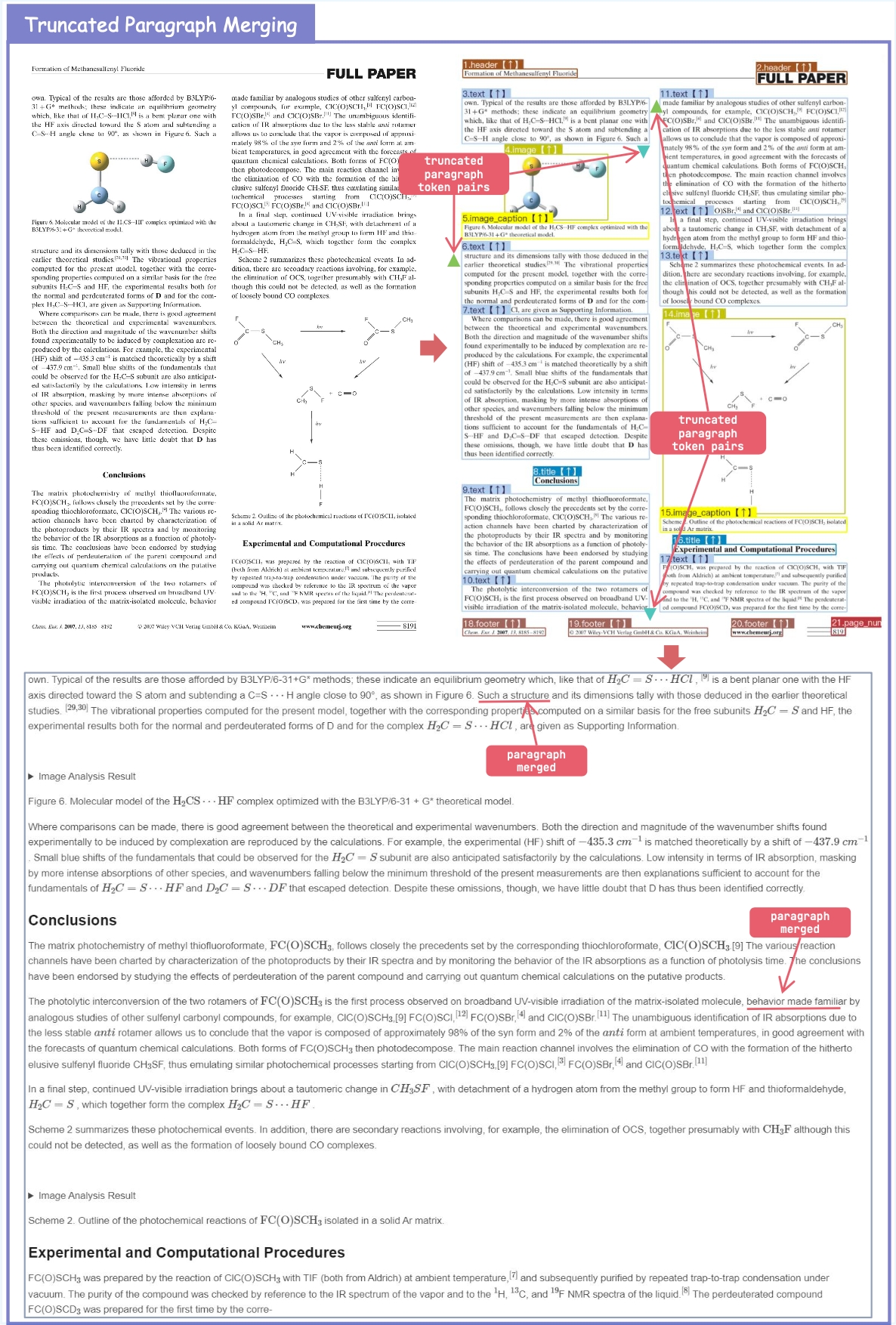
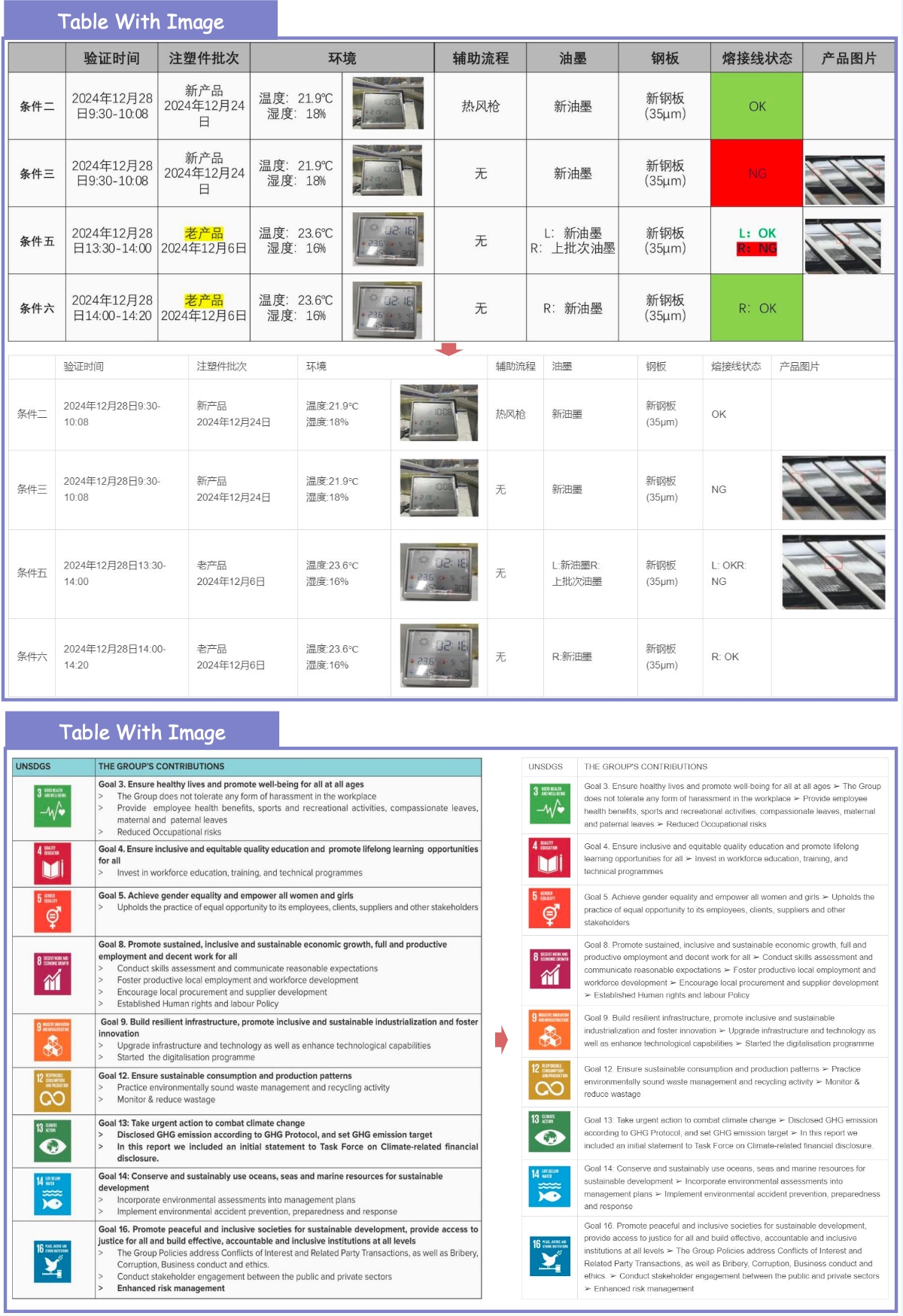
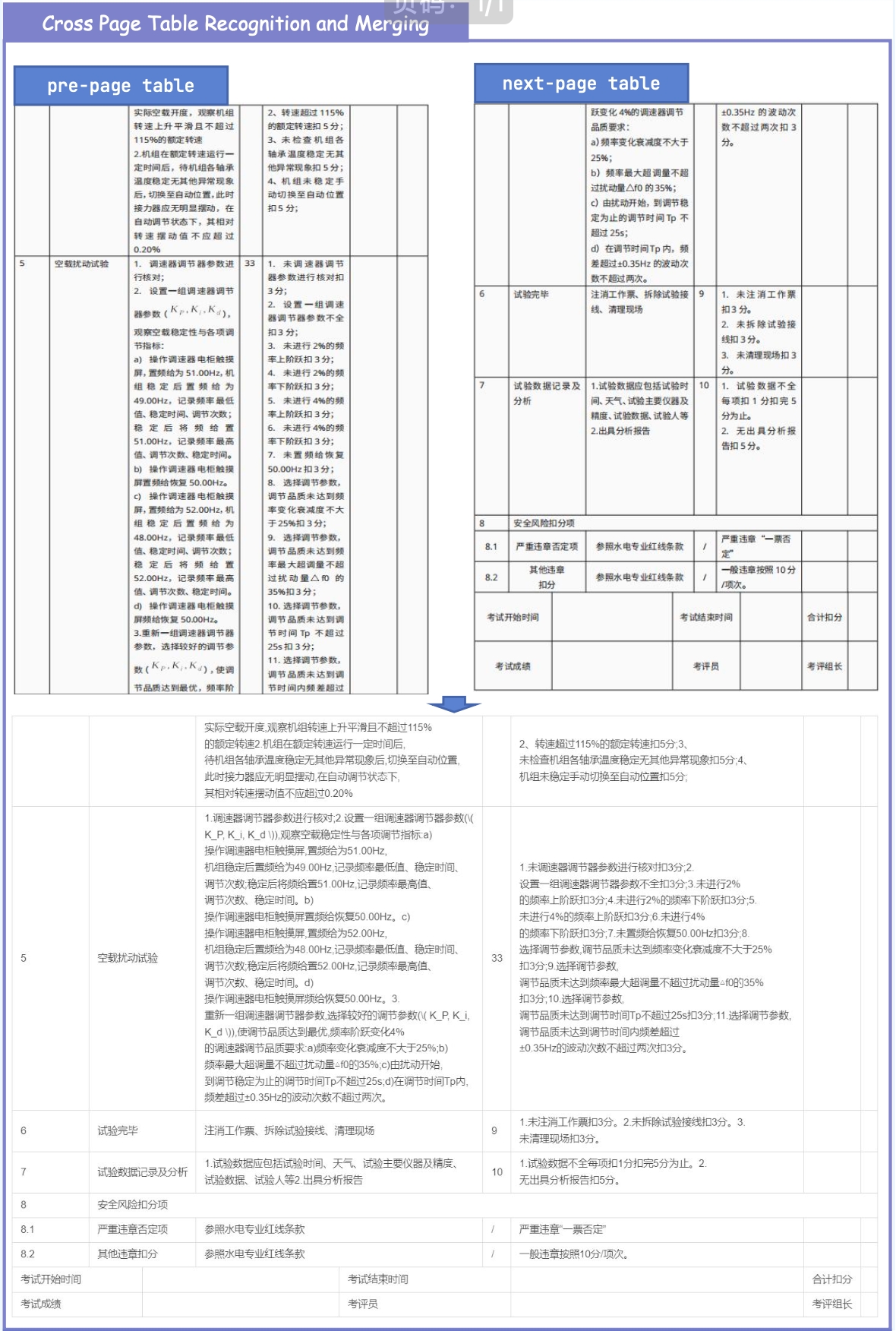
4. ✨ New Practical Capabilities Beyond metric improvements, MinerU2.5-Pro now natively supports: Image & Chart Parsing, Truncated Paragraph Merging, Cross-Page Table Merging and In-Table Image Recognition.
Current SOTA models (regardless of architecture) consistently fail on the same set of complex layouts. We realized the true bottleneck is training data deficiency and annotation noise. To fix this, we built a novel Data Engine:
Bottom Line: MinerU2.5-Pro proves that systematic data engineering is the ultimate lever for document parsing, providing the most accurate structural extraction available today for LLM data pipelines and advanced RAG systems.
For convenience, we provide mineru-vl-utils, a Python package that simplifies the process of sending requests and handling responses from MinerU2.5-Pro Vision-Language Model. Here we give some examples to use MinerU2.5-Pro. For more information and usages, please refer to mineru-vl-utils.
📌 We strongly recommend using vllm for inference, as the vllm-async-engine can achieve a concurrent inference speed of 2.12 fps on one A100.
# For `transformers` backend
pip install "mineru-vl-utils[transformers]"
# For `vllm-engine` and `vllm-async-engine` backend
pip install "mineru-vl-utils[vllm]"
transformers Example
from transformers import AutoProcessor, Qwen2VLForConditionalGeneration
from PIL import Image
from mineru_vl_utils import MinerUClient

# for transformers>=4.56.0
model = Qwen2VLForConditionalGeneration.from_pretrained(
    "opendatalab/MinerU2.5-Pro-2605-1.2B", dtype="auto", device_map="auto"
)

processor = AutoProcessor.from_pretrained(
    "opendatalab/MinerU2.5-Pro-2605-1.2B", use_fast=True
)

client = MinerUClient(
    backend="transformers", model=model, processor=processor,
    image_analysis=False # default False, set True to enable image/chart analysis
)

print(client.two_step_extract(Image.open("/path/to/page.png")))
vllm-engine Example (Recommended!)
from vllm import LLM
from PIL import Image
from mineru_vl_utils import MinerUClient
from mineru_vl_utils import MinerULogitsProcessor  # if vllm>=0.10.1

llm = LLM(
    model="opendatalab/MinerU2.5-Pro-2605-1.2B",
    logits_processors=[MinerULogitsProcessor]  # if vllm>=0.10.1
)

client = MinerUClient(
    backend="vllm-engine", vllm_llm=llm,
    image_analysis=False # default False, set True to enable image/chart analysis
)

print(client.two_step_extract(Image.open("/path/to/page.png")))
from mineru_vl_utils.post_process import json2md

# ... omit client initialize
content_list = client.two_step_extract(Image.open("path/to/page.png"))
md_res = json2md(content_list)
🚧 Cross-Page Table Merging: Currently under integration. Stay tuned!
We would like to thank Qwen Team, vLLM, OmniDocBench, PaddleOCR, UniMERNet, DocLayout-YOLO for providing valuable code and models. We also appreciate everyone's contribution to this open-source project!
If you find our work useful in your research, please consider giving a star ⭐ and citation 📝 :
@misc{wang2026mineru25propushinglimitsdatacentric,
      title={MinerU2.5-Pro: Pushing the Limits of Data-Centric Document Parsing at Scale},
      author={Bin, Wang and Tianyao, He and Linke, Ouyang and Fan, Wu and Zhiyuan, Zhao and Tao, Chu and Yuan, Qu and Zhenjiang, Jin and Weijun, Zeng and Ziyang, Miao and Bangrui, Xu and Junbo, Niu and others},
      year={2026},
      eprint={2604.04771},
      archivePrefix={arXiv},
      primaryClass={cs.CV},
      url={https://arxiv.org/abs/2604.04771},
}
4-bit
5-bit
6-bit
8-bit
16-bit
Base model
opendatalab/MinerU2.5-Pro-2605-1.2B