


Qwen3.6-Optimized
Collection
3 items • Updated • 1
NVFP4 quantized version of Qwen/Qwen3.6-27B by vrfai using llm-compressor.
Tested and deployed on 2× NVIDIA RTX 5090 with full tensor-parallel inference via vLLM.
| Base model | Qwen/Qwen3.6-27B |
| Quantization | NVFP4 — weights FP4, activations FP4 (dynamic local), scales FP8 |
| Format | compressed-tensors (native vLLM support) |
| Tool | vllm-project/llm-compressor |
| Requires | NVIDIA Blackwell GPU (SM 120+), vLLM ≥ 0.19 |
The quantization strategy carefully preserves the most sensitive components in BF16 while aggressively compressing the compute-heavy stable layers:
| Component | Precision | Reason |
|---|---|---|
| FFN / MLP — all 64 transformer layers | NVFP4 | High parameter density, stable under quantization |
| Full-attention projections (q/k/v/o) — 16 GQA layers | NVFP4 | Standard attention, tolerant to 4-bit |
| DeltaNet / Linear-attention projections — 48 layers | BF16 | Gated linear recurrence is sensitive to numerical errors |
| Vision encoder — all 27 blocks + merger | BF16 | Vision tower preserved to maintain multimodal quality |
lm_head |
BF16 | Output logits preserved for generation stability |
The architecture of Qwen3.6-27B interleaves 3 × DeltaNet (linear attention) layers with 1 × full GQA attention every 4 layers (16 such groups × 4 = 64 layers total). Only the full-attention group and all FFN layers are quantized; the DeltaNet recurrent cores are untouched.
# recipe.yaml
QuantizationModifier:
  targets: [Linear]
  scheme: NVFP4
  ignore:
    - lm_head
    # Vision encoder — all 27 blocks (attn + mlp) + merger
    - re:model\.visual\.blocks\.\d+\..*
    - model.visual.merger.linear_fc1
    - model.visual.merger.linear_fc2
    # DeltaNet / Linear-attention layers (layers 0–2, 4–6, 8–10, ..., 60–62)
    - re:model\.language_model\.layers\.\d+\.linear_attn\..*
vllm serve vrfai/Qwen3.6-27B-NVFP4 \
  --max-model-len 8192 \
  --gpu-memory-utilization 0.9 \
  --dtype auto \
  --trust-remote-code \
  --tensor-parallel-size 2
For single-GPU Blackwell (e.g., RTX 5090 with 32 GB):
vllm serve vrfai/Qwen3.6-27B-NVFP4 \
  --max-model-len 8192 \
  --gpu-memory-utilization 0.92 \
  --dtype auto \
  --trust-remote-code
from transformers import Qwen3_5ForConditionalGeneration, AutoTokenizer

model_name = "vrfai/Qwen3.6-27B-NVFP4"
tokenizer = AutoTokenizer.from_pretrained(model_name, trust_remote_code=True)
model = Qwen3_5ForConditionalGeneration.from_pretrained(
    model_name,
    torch_dtype="auto",
    device_map="auto",
    trust_remote_code=True,
)

messages = [{"role": "user", "content": "Explain quantization in one paragraph."}]
text = tokenizer.apply_chat_template(messages, tokenize=False, add_generation_prompt=True)
inputs = tokenizer(text, return_tensors="pt").to(model.device)
outputs = model.generate(**inputs, max_new_tokens=512)
print(tokenizer.decode(outputs[0][inputs.input_ids.shape[1]:], skip_special_tokens=True))
from openai import OpenAI

client = OpenAI(base_url="http://localhost:8000/v1", api_key="EMPTY")

response = client.chat.completions.create(
    model="vrfai/Qwen3.6-27B-NVFP4",
    messages=[{"role": "user", "content": "Hello!"}],
    temperature=0.7,
    max_tokens=512,
)
print(response.choices[0].message.content)
| Component | Version |
|---|---|
| vLLM | 0.19.1 |
| Transformers | 5.6.0 |
| PyTorch | 2.10.0+cu128 |
| CUDA | 12.8 (nvcc 12.8.61) |
| llm-compressor | compressed-tensors 0.14.0.1 |
| GPU | 2× NVIDIA RTX 5090 (tensor-parallel-size 2) |
| OS | Ubuntu 24 |
Sampling parameters:
| Mode | temperature | top_p | top_k | presence_penalty |
|---|---|---|---|---|
| Thinking — general | 1.0 | 0.95 | 20 | 0.0 |
| Thinking — coding (WebDev) | 0.6 | 0.95 | 20 | 0.0 |
| Non-thinking / instruct | 0.7 | 0.80 | 20 | 1.5 |
Output length: Recommend max_new_tokens=32768 for most tasks; up to 81920 for complex math/coding benchmarks.
Thinking mode (enable via chat template):
text = tokenizer.apply_chat_template(
    messages,
    tokenize=False,
    add_generation_prompt=True,
    chat_template_kwargs={"enable_thinking": True},
)
Below is the original model card from Qwen/Qwen3.6-27B:
This repository contains model weights and configuration files for the post-trained model in the Hugging Face Transformers format.
These artifacts are compatible with Hugging Face Transformers, vLLM, SGLang, KTransformers, etc.
Following the February release of the Qwen3.5 series, we're pleased to share the first open-weight variant of Qwen3.6. Built on direct feedback from the community, Qwen3.6 prioritizes stability and real-world utility, offering developers a more intuitive, responsive, and genuinely productive coding experience.
This release delivers substantial upgrades, particularly in
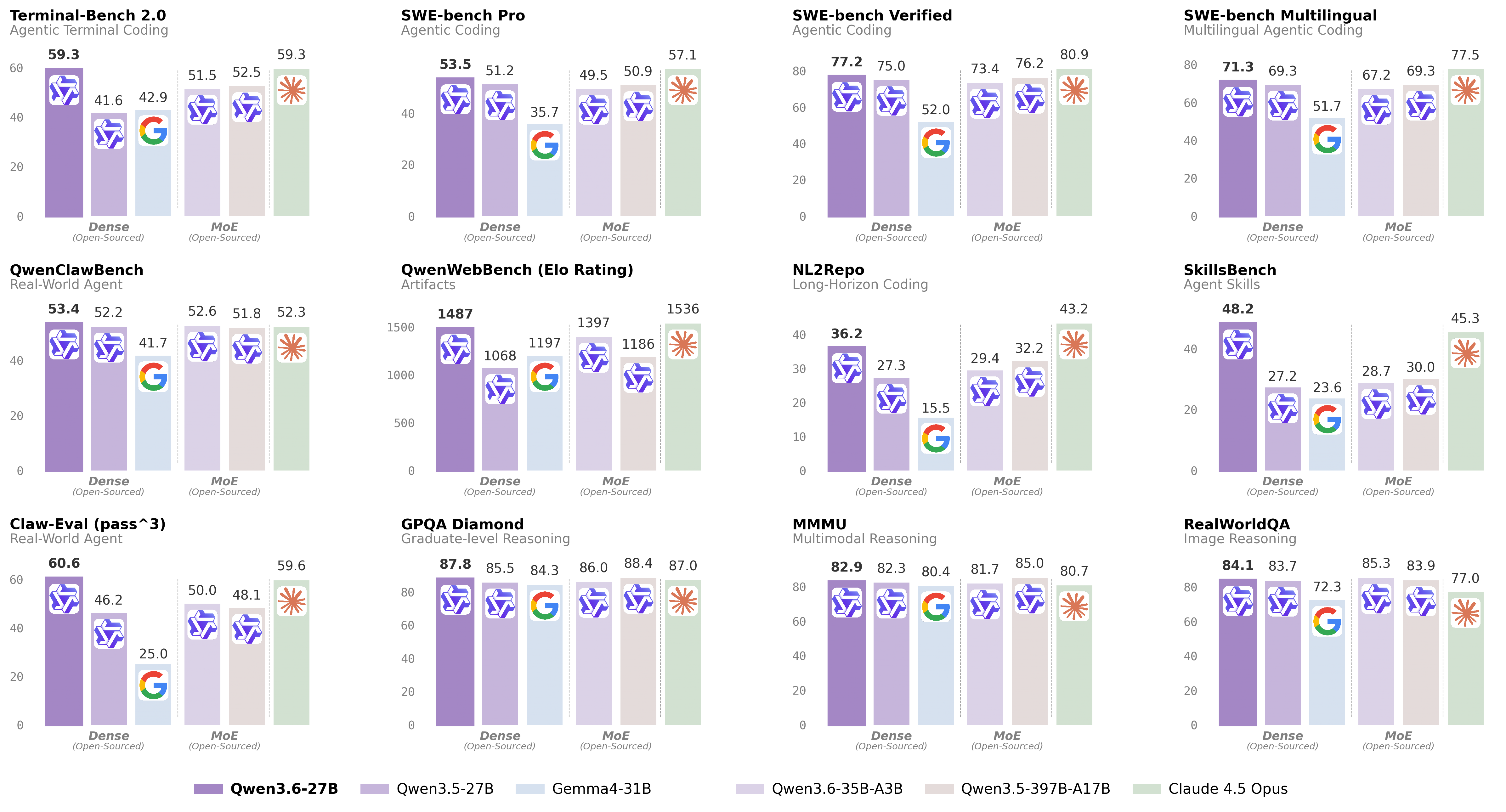
For more details, please refer to our blog post Qwen3.6-27B.
@misc{qwen3.6-27b,
    title  = {{Qwen3.6-27B}: Flagship-Level Coding in a {27B} Dense Model},
    author = {{Qwen Team}},
    month  = {April},
    year   = {2026},
    url    = {https://qwen.ai/blog?id=qwen3.6-27b}
}
Base model
Qwen/Qwen3.6-27B